
Screenshots

App details
- Version
- 5.2.5
- Size
- 1.11 MB
- Updated
- January 31, 2023
- Requires
- Windows 7
- Language
- English | Arabic | German | Spanish | Fr...
- License
- Free
- Developer
- PCFit Tech
- Category
- Windows OS
SoftPas in:
This product is also available in the following languages:
About Free Auto Clicker
Free Auto Clicker – Fast, Safe Mouse Automation
Overview
Free Auto Clicker is a lightweight desktop application designed to automate repetitive mouse clicks on Windows systems. It enables users to schedule and execute left or right mouse button clicks at specified intervals, improving speed and precision in tasks that require repeated interactions. This software is particularly useful for users who perform high-volume clicking operations, such as completing online surveys, managing multiple web pages, or engaging in gameplay scenarios where rapid clicking is necessary.
The tool is tailored for individuals seeking a no-cost solution to reduce physical strain from prolonged mouse use. It supports Windows XP through Windows 10, making it accessible to users on older or legacy systems. The interface is available in English only, and the software operates entirely on the local machine without requiring internet connectivity. It is suitable for both casual users and professionals handling repetitive digital workflows.
Real-world applications include automating time-sensitive actions like placing eBay bids, responding to stock market fluctuations, or accelerating in-game activities such as mining or building in games like Minecraft. By offloading repetitive clicking tasks, users can free up mental and physical energy for more strategic or creative work.
Key Features & Capabilities
- Automated Click Scheduling – Users can set custom intervals between clicks, enabling precise control over click frequency, from single clicks to rapid bursts.
- Left and Right Button Support – The software allows independent automation of both left and right mouse buttons, offering flexibility for different use cases.
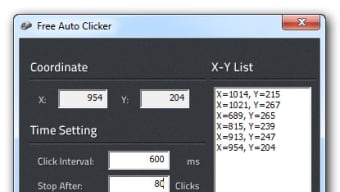
- Click Position Recording – By pressing the spacebar, users can save the exact X and Y coordinates of a mouse click location, enabling accurate reproduction of actions across screen elements.
- Hotkey Controls – Start, stop, and pause automation using customizable keyboard shortcuts, ensuring seamless integration into active workflows.
- Multi-Click Sequence Storage – Saved click positions can be grouped and reused, allowing users to create reusable click patterns for recurring tasks.
- Low Resource Usage – With a file size of 2.5 MB, the application is designed to run efficiently without consuming significant system resources.
These features allow users to streamline tasks that involve repetitive clicking, such as data entry, form filling, or game automation. For example, a user can record a sequence of clicks to navigate through a survey form and replay it repeatedly, saving hours of manual input. Similarly, gamers can use the tool to automate repetitive in-game actions, reducing hand fatigue during extended sessions.
User Interface, Workflow & Performance
The user interface of Free Auto Clicker is minimalistic and functional, focusing on core automation tasks without unnecessary visual distractions. Navigation is straightforward, with clear labels for click type, interval settings, and position recording. The main workflow involves positioning the cursor, pressing the spacebar to register a click point, and configuring the automation parameters.
Users can manage multiple click sequences and toggle automation on and off using hotkeys, which enhances workflow continuity. The software operates in the background, allowing other applications to run without interference. Performance observations are based on general software behavior patterns; no specific benchmarks or resource usage data were provided by the developer.
Stability is expected to be consistent, given the application’s small footprint and targeted use case. The developer did not specify resource usage details, such as CPU or RAM consumption. However, its lightweight nature suggests efficient operation on systems with limited processing power. No known conflicts with other software were reported in the provided information.
Compatibility & System Requirements
Free Auto Clicker is compatible with Windows XP through Windows 10, covering a broad range of legacy and modern Windows environments. This wide compatibility ensures accessibility for users with older hardware or restricted system updates. The software has a file size of 2.5 MB, indicating a minimal installation footprint.
Exact system requirements were not listed. The developer did not provide additional system requirements beyond the supported operating systems. Hardware specifications such as processor speed, RAM, or graphics capabilities were not specified. Platform compatibility information is limited to the Windows operating system range.
There is no version available for Mac, iPad, or other non-Windows platforms. The application does not require internet access to function, operating entirely offline once installed.
Pros and Cons
Pros
- Completely free to use with no hidden costs
- Lightweight at only 2.5 MB in size
- Supports both left and right mouse button automation
- Simple, intuitive interface with minimal learning curve
- Works on older Windows systems (XP to 10)
- Uses hotkeys for quick control without interrupting workflow
Cons
- Available only for Windows, with no Mac or mobile support
- Interface available in English only
- Exact performance and resource usage details were not specified
- No built-in recording for mouse movements or keyboard input
- Limited to click automation—no broader macro capabilities
FAQ Section
Is Free Auto Clicker safe to use?
Yes, according to the developer, Free Auto Clicker contains no malware or viruses and is safe to use on Windows systems.
Can I use Free Auto Clicker on Mac or iPad?
No. The software is designed exclusively for Windows XP to Windows 10 and is not available for Mac, iPad, or other operating systems.
Does Free Auto Clicker require an internet connection?
No. The application operates entirely offline and does not require internet access to function.
How do I start and stop automation?
Automation can be controlled using hotkeys, which are customizable for quick start, stop, and pause functions.
Is there a license type for Free Auto Clicker?
Yes, the software is distributed as free and open to use without restrictions. No license key or registration is required.
Final Thoughts + CTA
Free Auto Clicker delivers a focused, reliable solution for users seeking to automate repetitive mouse clicks on Windows systems. Its lightweight design, ease of use, and compatibility with older Windows versions make it a practical choice for both casual and power users. While it lacks advanced macro recording or multi-platform support, its core functionality is executed efficiently and safely.
Those who perform repetitive clicking tasks—whether in gaming, data entry, or online transactions—will benefit most from this tool. It reduces physical strain, improves accuracy, and frees up time for more meaningful work. With no cost and a straightforward setup, it stands out as a solid option in the automation space.
Download Free Auto Clicker now to automate your repetitive mouse tasks with speed and precision.
Guides & Tutorials
How to install Free Auto Clicker
- Click the Download button above.
- Once redirected, accept the terms and click Install.
- Wait for the Free Auto Clicker download to finish on your device.
How to use Free Auto Clicker
This software is primarily used for its core features described above. Open the app after installation to explore its capabilities.
User Reviews
No reviews yet. Be the first to share your experience.
You may also like
more
Llama 2
Free-to-use large language model As the new addition to Meta’s arsenal of langua...

NotebookLM
Revolutionizing the note-taking and idea-generation process NotebookLM is an exp...

Github co pilot
AI-inspired software development and coding platform GitHub Copilot is a browser...

Google Gemma
Google’s lightweight AI models Introducing Google Gemma , a family of cutting-ed...

AI Image Enlarger
A free app for Windows, by ai-image-larger. AI Image Enlarger is a free software...

DALL E
AI-driven text-to-image transformation engine DALL·E is a free graphic and desig...